![[ChimeraX Issue Tracking System]](/trac/ChimeraX/chrome/site/ChimeraX-icon.svg)
#20601 closed defect (not a bug)
Problem aligning structure and map
| Reported by: | Owned by: | Tom Goddard | |
|---|---|---|---|
| Priority: | normal | Milestone: | |
| Component: | Volume Data | Version: | |
| Keywords: | Cc: | Eric Pettersen | |
| Blocked By: | Blocking: | ||
| Notify when closed: | Platform: | all | |
| Project: | ChimeraX |
Description
The following bug report has been submitted:
Platform:        macOS-26.5.1-arm64-arm-64bit
ChimeraX Version: 1.12 (2026-06-12 03:42:34 UTC)
Description
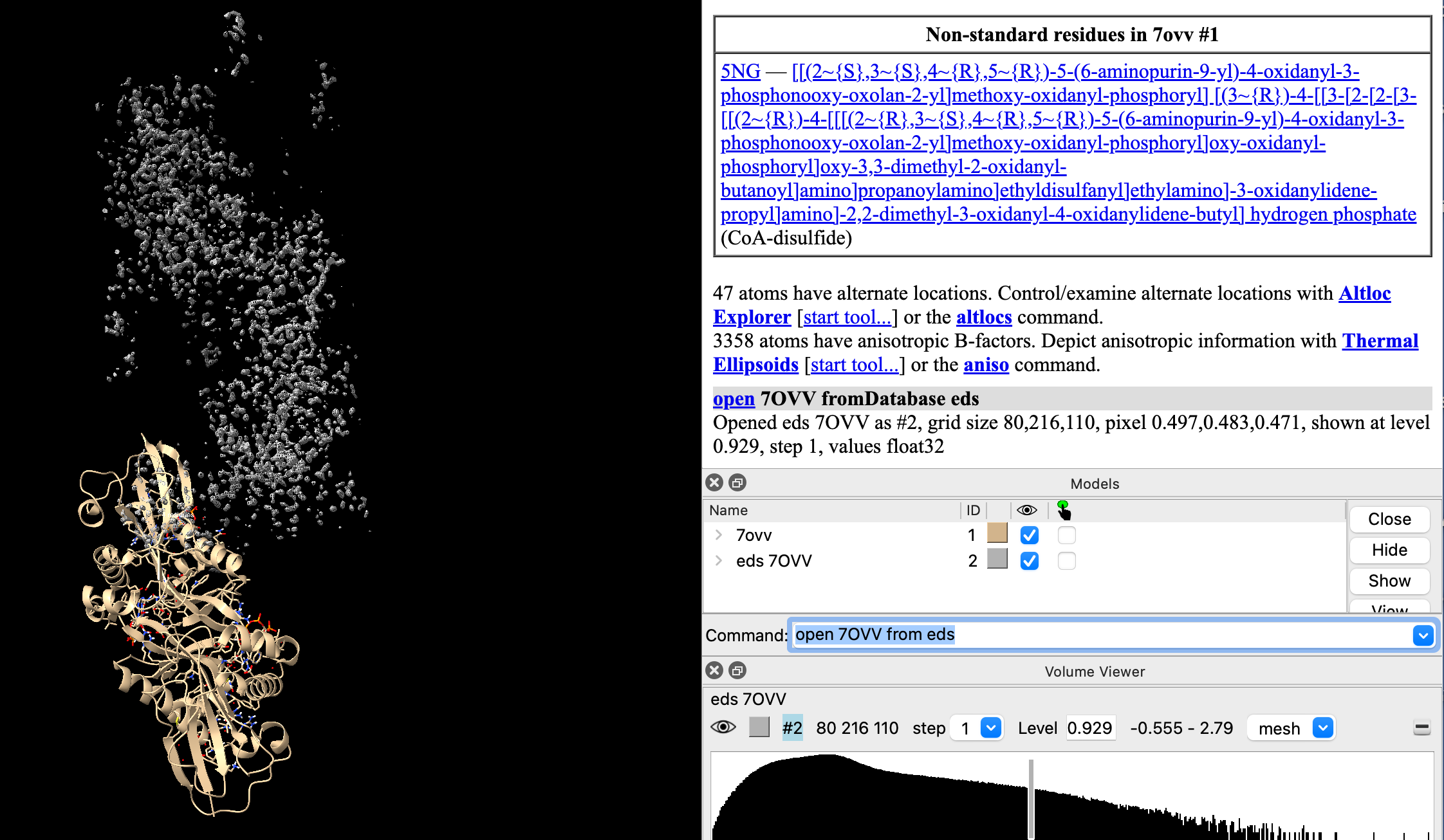
Sorry to bother. I am having trouble aligning the experimental electron density map onto a protein. It worked long time ago by using Chimera (still have it), but the ChimeraX 1.12 does not work. Lined up manually but the meshes (electrons) don't align to atoms at higher resolution. Thanks for any advice.

Log:
Window position QRect(-6,856 200x100) outside any known screen, using primary
screen

UCSF ChimeraX version: 1.12 (2026-06-12)
© 2016-2026 Regents of the University of California. All rights reserved.
How to cite UCSF ChimeraX

> help help:contact.html


OpenGL version: 4.1 Metal - 90.5
OpenGL renderer: Apple M2
OpenGL vendor: Apple

Python: 3.11.9
Locale: en_US.UTF-8
Qt version: PyQt6 6.10.2, Qt 6.10.0
Qt runtime version: 6.10.2
Qt platform: cocoa
Hardware:

    Hardware Overview:

      Model Name: MacBook Air
      Model Identifier: Mac14,2
      Model Number: Z15Y000YKFN/A
      Chip: Apple M2
      Total Number of Cores: 8 (4 Performance and 4 Efficiency)
      Memory: 16 GB
      System Firmware Version: 18000.120.36
      OS Loader Version: 18000.120.36

Software:

    System Software Overview:

      System Version: macOS 26.5.1 (25F80)
      Kernel Version: Darwin 25.5.0
      Time since boot: 36 days, 17 hours, 44 minutes

Graphics/Displays:

    Apple M2:

      Chipset Model: Apple M2
      Type: GPU
      Bus: Built-In
      Total Number of Cores: 8
      Vendor: Apple (0x106b)
      Metal Support: Metal 4
      Displays:
        Color LCD:
          Display Type: Built-in Liquid Retina Display
          Resolution: 2560 x 1664 Retina
          Main Display: Yes
          Mirror: Off
          Online: Yes
          Automatically Adjust Brightness: Yes
          Connection Type: Internal


Installed Packages:
    accessible-pygments: 0.0.5
    aiohappyeyeballs: 2.6.2
    aiohttp: 3.13.4
    aiosignal: 1.4.0
    alabaster: 1.0.0
    annotated-types: 0.7.0
    anyio: 4.13.0
    appdirs: 1.4.4
    appnope: 0.1.4
    asttokens: 3.0.1
    attrs: 26.1.0
    babel: 2.18.0
    beautifulsoup4: 4.13.5
    blockdiag: 3.0.0
    blosc2: 4.4.3
    bs4: 0.0.2
    build: 1.3.0
    certifi: 2025.7.14
    cftime: 1.6.5
    charset-normalizer: 3.4.7
    ChimeraX-AddCharge: 1.5.20
    ChimeraX-AddH: 2.2.8
    ChimeraX-AlignmentAlgorithms: 2.0.2
    ChimeraX-AlignmentHdrs: 3.6.2
    ChimeraX-AlignmentMatrices: 2.1
    ChimeraX-Alignments: 3.2
    ChimeraX-AlphaFold: 1.0.1
    ChimeraX-AltlocExplorer: 1.2
    ChimeraX-AmberInfo: 1.0
    ChimeraX-Animations: 1.0
    ChimeraX-Aniso: 1.3.2
    ChimeraX-Arrays: 1.1
    ChimeraX-Atomic: 1.67.1
    ChimeraX-AtomicLibrary: 14.4
    ChimeraX-AtomSearch: 2.0.1
    ChimeraX-AxesPlanes: 2.4
    ChimeraX-BasicActions: 1.1.3
    ChimeraX-BILD: 1.0
    ChimeraX-BlastProtein: 3.0.0
    ChimeraX-Boltz: 1.1
    ChimeraX-BondRot: 2.0.4
    ChimeraX-BugReporter: 1.0.2
    ChimeraX-BuildStructure: 2.13.1
    ChimeraX-Bumps: 1.0
    ChimeraX-BundleBuilder: 1.6.0
    ChimeraX-ButtonPanel: 1.0.1
    ChimeraX-CageBuilder: 1.0.1
    ChimeraX-CellPack: 1.0
    ChimeraX-Centroids: 1.4.1
    ChimeraX-ChangeChains: 1.1
    ChimeraX-CheckWaters: 1.5
    ChimeraX-ChemGroup: 2.0.2
    ChimeraX-Clashes: 2.4
    ChimeraX-Cluster: 1.0
    ChimeraX-ColorActions: 1.0.5
    ChimeraX-ColorGlobe: 1.0
    ChimeraX-ColorKey: 1.5.8
    ChimeraX-CommandLine: 1.3.1
    ChimeraX-ConnectStructure: 2.0.1
    ChimeraX-Contacts: 1.0.1
    ChimeraX-Core: 1.12
    ChimeraX-CoreFormats: 1.2
    ChimeraX-coulombic: 1.4.5
    ChimeraX-Crosslinks: 1.0
    ChimeraX-Crystal: 1.0
    ChimeraX-CrystalContacts: 1.0.1
    ChimeraX-DataFormats: 1.2.4
    ChimeraX-Dicom: 1.2.7
    ChimeraX-DistMonitor: 1.4.2
    ChimeraX-DockPrep: 1.2.2
    ChimeraX-Dssp: 2.0
    ChimeraX-EMDB-SFF: 1.0
    ChimeraX-ESMFold: 1.0
    ChimeraX-FileHistory: 1.0.1
    ChimeraX-FunctionKey: 1.0.1
    ChimeraX-Geometry: 1.3
    ChimeraX-gltf: 1.0
    ChimeraX-Graphics: 1.4.1
    ChimeraX-Hbonds: 2.5.3
    ChimeraX-Help: 1.3
    ChimeraX-HKCage: 1.3
    ChimeraX-IHM: 1.1
    ChimeraX-ImageFormats: 1.2
    ChimeraX-IMOD: 1.0
    ChimeraX-IO: 1.0.4
    ChimeraX-ItemsInspection: 1.0.1
    ChimeraX-IUPAC: 1.0
    ChimeraX-KVFinder: 1.8.2
    ChimeraX-Label: 1.5
    ChimeraX-LightingGUI: 1.0
    ChimeraX-ListInfo: 1.3.1
    ChimeraX-Log: 1.2.2
    ChimeraX-LookingGlass: 1.1
    ChimeraX-Maestro: 1.9.3
    ChimeraX-Map: 1.3
    ChimeraX-MapData: 2.0
    ChimeraX-MapEraser: 1.0.1
    ChimeraX-MapFilter: 2.0.1
    ChimeraX-MapFit: 2.0
    ChimeraX-MapSeries: 2.1.1
    ChimeraX-Markers: 1.0.1
    ChimeraX-Mask: 1.0.2
    ChimeraX-MatchAlign: 1.2
    ChimeraX-MatchMaker: 2.4.1
    ChimeraX-MCopy: 1.0
    ChimeraX-MCPServer: 0.2.0
    ChimeraX-MDcrds: 2.19
    ChimeraX-MedicalToolbar: 1.1
    ChimeraX-Meeting: 1.0.1
    ChimeraX-Minimize: 1.3.9
    ChimeraX-MLP: 1.1.1
    ChimeraX-mmCIF: 2.16
    ChimeraX-MMTF: 2.2
    ChimeraX-ModelArchive: 1.0
    ChimeraX-Modeller: 1.5.23
    ChimeraX-ModelPanel: 1.6.1
    ChimeraX-ModelSeries: 1.0.1
    ChimeraX-Mol2: 2.0.3
    ChimeraX-Mole: 1.0
    ChimeraX-Morph: 1.0.2
    ChimeraX-MouseModes: 1.2
    ChimeraX-Movie: 1.0.1
    ChimeraX-MutationScores: 1.0
    ChimeraX-Neuron: 1.0
    ChimeraX-Nifti: 1.2
    ChimeraX-NMRSTAR: 1.0.2
    ChimeraX-NRRD: 1.2
    ChimeraX-Nucleotides: 2.0.3
    ChimeraX-OpenCommand: 1.15.4
    ChimeraX-OpenFold: 1.0
    ChimeraX-OrthoPick: 1.0.1
    ChimeraX-PDB: 2.7.13
    ChimeraX-PDBBio: 1.0.1
    ChimeraX-PDBLibrary: 1.0.5
    ChimeraX-PDBMatrices: 1.0
    ChimeraX-PickBlobs: 1.0.1
    ChimeraX-Positions: 1.0
    ChimeraX-PresetMgr: 1.1.4
    ChimeraX-ProfileGrids: 1.6
    ChimeraX-PubChem: 2.2
    ChimeraX-ReadPbonds: 1.0.1
    ChimeraX-Registration: 1.1.2
    ChimeraX-RemoteControl: 1.0
    ChimeraX-RenderByAttr: 1.8.2
    ChimeraX-RenumberResidues: 1.1
    ChimeraX-ResidueFit: 1.0.1
    ChimeraX-RestServer: 1.3.3
    ChimeraX-RNALayout: 1.0
    ChimeraX-RotamerLibMgr: 4.0
    ChimeraX-RotamerLibsDunbrack: 2.0
    ChimeraX-RotamerLibsDynameomics: 2.0
    ChimeraX-RotamerLibsRichardson: 2.0
    ChimeraX-SaveCommand: 1.5.2
    ChimeraX-Scenes: 0.3.1
    ChimeraX-SchemeMgr: 1.0
    ChimeraX-SDF: 2.0.3
    ChimeraX-Segger: 1.0
    ChimeraX-Segment: 1.0.1
    ChimeraX-Segmentations: 3.5.12
    ChimeraX-SelInspector: 1.0
    ChimeraX-SeqView: 2.18
    ChimeraX-Shape: 1.1
    ChimeraX-Shell: 1.0.1
    ChimeraX-Shortcuts: 1.2.1
    ChimeraX-ShowSequences: 1.0.3
    ChimeraX-SideView: 1.0.1
    ChimeraX-SimilarStructures: 1.0.1
    ChimeraX-Smiles: 2.1.2
    ChimeraX-SmoothLines: 1.0
    ChimeraX-SNFG: 1.0
    ChimeraX-SpaceNavigator: 1.0
    ChimeraX-StdCommands: 1.19.3
    ChimeraX-STL: 1.0.1
    ChimeraX-Storm: 1.0
    ChimeraX-StructMeasure: 1.2.1
    ChimeraX-Struts: 1.0.1
    ChimeraX-Surface: 1.0.1
    ChimeraX-SwapAA: 2.0.1
    ChimeraX-SwapRes: 2.5.3
    ChimeraX-TapeMeasure: 1.0
    ChimeraX-TaskManager: 1.0
    ChimeraX-Test: 1.0
    ChimeraX-Toolbar: 1.2.4
    ChimeraX-ToolshedUtils: 1.2.4
    ChimeraX-Topography: 1.0
    ChimeraX-ToQuest: 1.0
    ChimeraX-Tug: 1.0.1
    ChimeraX-UI: 1.50.8
    ChimeraX-Umap: 1.0
    ChimeraX-uniprot: 2.3.2
    ChimeraX-UnitCell: 1.0.1
    ChimeraX-ViewDock: 1.6.2
    ChimeraX-VIPERdb: 1.0
    ChimeraX-Vive: 1.1
    ChimeraX-VolumeMenu: 1.0.1
    ChimeraX-vrml: 1.0
    ChimeraX-VTK: 1.0
    ChimeraX-WavefrontOBJ: 1.0
    ChimeraX-WebCam: 1.0.2
    ChimeraX-WebServices: 1.1.5
    ChimeraX-Zone: 1.0.1
    click: 8.4.1
    colorama: 0.4.6
    comm: 0.2.3
    contourpy: 1.3.3
    coverage: 7.14.1
    cxservices: 1.2.3
    cycler: 0.12.1
    Cython: 3.2.4
    debugpy: 1.8.21
    decorator: 5.3.1
    docutils: 0.21.2
    executing: 2.2.1
    filelock: 3.19.1
    fonttools: 4.63.0
    frozenlist: 1.8.0
    funcparserlib: 2.0.0a0
    glfw: 2.10.0
    grako: 3.16.5
    h11: 0.16.0
    h5py: 3.16.0
    html2text: 2025.4.15
    httpcore: 1.0.9
    httpx: 0.28.1
    httpx-sse: 0.4.3
    idna: 3.18
    ihm: 2.2
    imagecodecs: 2024.6.1
    imagesize: 2.0.0
    iniconfig: 2.3.0
    ipykernel: 7.1.0
    ipython: 9.9.0
    ipython_pygments_lexers: 1.1.1
    jedi: 0.19.2
    Jinja2: 3.1.6
    jsonschema: 4.26.0
    jsonschema-specifications: 2025.9.1
    jupyter_client: 8.8.0
    jupyter_core: 5.9.1
    kiwisolver: 1.5.0
    line_profiler: 5.0.0
    lxml: 6.0.2
    lz4: 4.3.2
    Markdown: 3.8.2
    MarkupSafe: 3.0.3
    matplotlib: 3.10.7
    matplotlib-inline: 0.2.2
    mcp: 1.18.0
    msgpack: 1.1.1
    multidict: 6.7.1
    narwhals: 2.22.1
    ndindex: 1.10.1
    nest-asyncio: 1.6.0
    netCDF4: 1.6.5
    networkx: 3.3
    nibabel: 5.2.0
    nptyping: 2.5.0
    numexpr: 2.14.1
    numpy: 1.26.4
    OpenMM: 8.4.0
    openvr: 1.26.701
    packaging: 25.0
    ParmEd: 4.2.2
    parso: 0.8.7
    pep517: 0.13.1
    pexpect: 4.9.0
    pickleshare: 0.7.5
    pillow: 11.3.0
    pip: 25.2
    pkginfo: 1.12.1.2
    platformdirs: 4.10.0
    plotly: 6.8.0
    pluggy: 1.6.0
    prompt_toolkit: 3.0.52
    propcache: 0.5.2
    psutil: 7.0.0
    ptyprocess: 0.7.0
    pure_eval: 0.2.3
    py-cpuinfo: 9.0.0
    pybind11: 3.0.1
    pycollada: 0.8
    pydantic: 2.13.4
    pydantic-settings: 2.14.1
    pydantic_core: 2.46.4
    pydata-sphinx-theme: 0.18.0
    pydicom: 2.4.4
    Pygments: 2.18.0
    pynmrstar: 3.5.1
    pynrrd: 1.0.0
    PyOpenGL: 3.1.10
    PyOpenGL-accelerate: 3.1.10
    pyopenxr: 1.1.4501
    pyparsing: 3.3.2
    pyproject_hooks: 1.2.0
    PyQt6-commercial: 6.10.2
    PyQt6-Qt6: 6.10.2
    PyQt6-WebEngine-commercial: 6.10.0
    PyQt6-WebEngine-Qt6: 6.10.2
    PyQt6_sip: 13.10.3
    pytest: 9.0.3
    pytest-cov: 7.1.0
    python-dateutil: 2.9.0.post0
    python-dotenv: 1.2.2
    python-multipart: 0.0.32
    pyzmq: 27.1.0
    qtconsole: 5.7.0
    QtPy: 2.4.3
    qtshim: 1.2.2
    RandomWords: 0.4.0
    referencing: 0.37.0
    requests: 2.32.5
    roman-numerals: 4.1.0
    rpds-py: 2026.5.1
    scipy: 1.14.0
    setuptools: 80.9.0
    sfftk-rw: 0.8.1
    six: 1.17.0
    snowballstemmer: 3.1.1
    sortedcontainers: 2.4.0
    soupsieve: 2.8.4
    Sphinx: 9.0.4
    sphinx-autodoc-typehints: 3.6.1
    sphinxcontrib-applehelp: 2.0.0
    sphinxcontrib-blockdiag: 3.0.0
    sphinxcontrib-devhelp: 2.0.0
    sphinxcontrib-htmlhelp: 2.1.0
    sphinxcontrib-jsmath: 1.0.1
    sphinxcontrib-qthelp: 2.0.0
    sphinxcontrib-serializinghtml: 2.0.0
    sse-starlette: 3.4.4
    stack-data: 0.6.3
    starlette: 1.3.0
    superqt: 0.7.6
    tables: 3.10.2
    tcia_utils: 3.2.1
    threadpoolctl: 3.6.0
    tifffile: 2025.3.13
    tinyarray: 1.2.5
    tornado: 6.5.7
    tqdm: 4.68.2
    traitlets: 5.14.3
    typing-inspection: 0.4.2
    typing_extensions: 4.15.0
    Unidecode: 1.4.0
    urllib3: 2.7.0
    uvicorn: 0.49.0
    wcwidth: 0.8.1
    webcolors: 24.11.1
    wheel: 0.45.1
    wheel-filename: 1.4.2
    yarl: 1.24.2
File attachment: PDB and eds.png
Attachments (1)
Change History (6)
by , 7 weeks ago
| Attachment: | PDB and eds.png added |
|---|
comment:1 by , 7 weeks ago
| Component: | Unassigned → Volume Data |
|---|---|
| Owner: | set to |
| Platform: | → all |
| Project: | → ChimeraX |
| Status: | new → assigned |
| Summary: | ChimeraX bug report submission → Problem aligning structure and map |
Reported by Jeffrey Leung
comment:2 by , 7 weeks ago
| Resolution: | → not a bug |
|---|---|
| Status: | assigned → closed |
The x-ray map from the Electron Density Server (ChimeraX command "open 7ovv from eds") covers a unit cell that does not include the 7ovv PDB model. You need to apply symmetry to the unit cell to get the part of the infinite crystal map that covers the PDB model. Here is the ChimeraX command to do that
where #2 is the EDS map and #1 is the 7ovv PDB model. Here is the documentation on the "volume cover" command.
https://www.cgl.ucsf.edu/chimerax/docs/user/commands/volume.html#cover
Our old Chimera program has the exact same issue and the command to fix it in Chimera was named "vop cover".
comment:3 by , 7 weeks ago
Thanks a million, problem solved.

On Fri, Jul 10, 2026 at 2:31 AM ChimeraX <ChimeraX-bugs-admin@cgl.ucsf.edu>
wrote:

>
>
>
>
>
>
>
>
comment:4 by , 7 weeks ago
Follow up: the old Chimera's command line moved from the bottom of the
screen to the top. It then disappeared into a transparent strip.
I switched over to the ChimeraX using in-line commands.  It was at the
bottom of the screen but became detached. If I double click on the command
line window, it goes into the log box. But this is not permanent, because
each time I open the ChimeraX, I need to repeat the operation. It could be
me typing with partially paralyzed fingers. If you have time and some
advice, I will appreciate that too.

Jeff

On Fri, Jul 10, 2026 at 11:28 AM Jeffrey Leung <openstomata@gmail.com>
wrote:

>
>
>> #20601: Problem aligning structure and map
>> ------------------------------------+-------------------------
>>           Reporter:  openstomata@…  |      Owner:  Tom Goddard
>>               Type:  defect         |     Status:  closed
>>           Priority:  normal         |  Milestone:
>>          Component:  Volume Data    |    Version:
>>         Resolution:  not a bug      |   Keywords:
>>         Blocked By:                 |   Blocking:
>> Notify when closed:                 |   Platform:  all
>>            Project:  ChimeraX       |
>> ------------------------------------+-------------------------
>> Changes (by Tom Goddard):
>>
>>  * resolution:   => not a bug
>>  * status:  assigned => closed
>>
>> Comment:
>>
>>  The x-ray map from the Electron Density Server (ChimeraX command "open
>>  7ovv from eds") covers a unit cell that does not include the 7ovv PDB
>>  model.  You need to apply symmetry to the unit cell to get the part of
>> the
>>  infinite crystal map that covers the PDB model.  Here is the ChimeraX
>>  command to do that
>>
>>  volume cover #2 atom #1
>>
>>  where #2 is the EDS map and #1 is the 7ovv PDB model.  Here is the
>>  documentation on the "volume cover" command.
>>
>>  https://www.cgl.ucsf.edu/chimerax/docs/user/commands/volume.html#cover
>>
>>  Our old Chimera program has the exact same issue and the command to fix
>> it
>>  in Chimera was named "vop cover".
>> --
>> Ticket URL: <
>> https://www.rbvi.ucsf.edu/trac/ChimeraX/ticket/20601#comment:2>
>> ChimeraX <https://www.rbvi.ucsf.edu/chimerax/>
>> ChimeraX Issue Tracker
>>
>
comment:5 by , 7 weeks ago
| Cc: | added |
|---|
Your old Chimera problem where the command-line at the bottom was covered by the graphics was a bug caused by macOS 26 and is fixed in the Chimera 1.20 release from a few weeks ago.
Your ChimeraX problem where the command-line does not appear at the bottom of the ChimeraX main window but is instead detached is probably because you changed a setting for the command-line accidentally. If your right click (on Mac ctrl-click) in the command-line entry field a menu will pop up and you want to have "Dockable tool" checked in that menu. If that is not checked then the command-line will always start floating. After you check that menu entry you may need to restart ChimeraX to get the command-line back to its normal place at the bottom of the main window.


Added by email2trac