![[ChimeraX Issue Tracking System]](/trac/ChimeraX/chrome/site/ChimeraX-icon.svg)
Opened 71 minutes ago
Closed 51 minutes ago
#20829 closed defect (fixed)
ChimeraX UI widgets look bad on macOS 26
| Reported by: | Tom Goddard | Owned by: | Tom Goddard |
|---|---|---|---|
| Priority: | moderate | Milestone: | |
| Component: | Platform | Version: | |
| Keywords: | Cc: | chimerax-programmers | |
| Blocked By: | Blocking: | ||
| Notify when closed: | Platform: | all | |
| Project: | ChimeraX |
Description
ChimeraX versions since early July 2026 and also development builds on macOS 26.x have ugly button, table, header appearance on macOS 26. Probably our Github nightly builds which use macos_latest updated causing the newer daily builds to have this bad appearance. The bad appearance is probably what Apple intends on macOS.
A way to restore the old appearance is to add the following to the ChimeraX Info.plist:
<key>UIDesignRequiresCompatibility</key>
<true/>
I'll attach an image showing the Models panel in the new flat, low contrast widgets versus the older widgets.
Attachments (1)
Change History (5)
by , 68 minutes ago
| Attachment: | model_panel.png added |
|---|
comment:1 by , 66 minutes ago
Specifically the headers of tables such as the model panel are white with no contrast with the actual table contents. The buttons on model panel have no vertical space between them and don't even look like buttons.
comment:2 by , 66 minutes ago
Maybe we should consider adding the Info.plist fix to the daily build.
comment:4 by , 51 minutes ago
| Resolution: | → fixed |
|---|---|
| Status: | assigned → closed |
Ok, I added the UIDesignRequiresCompatibility to Info.plist. We can reevaluate when macOS 27 comes out in the Fall.


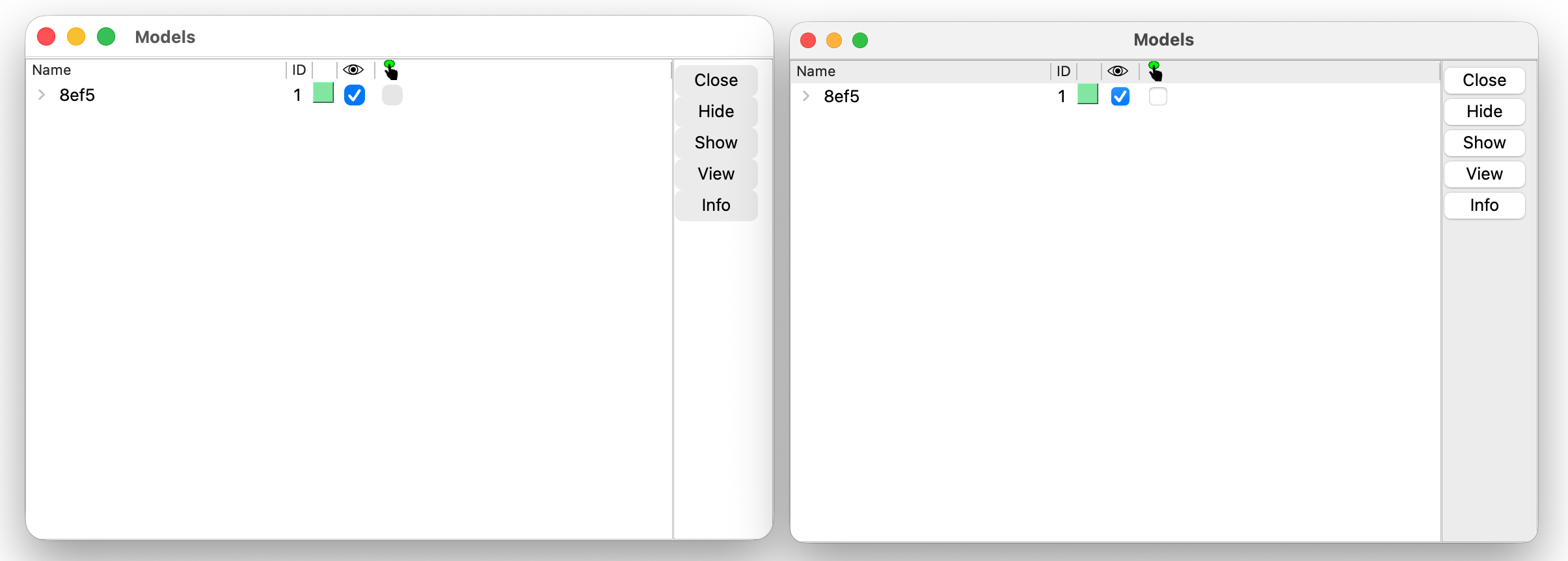
Model panel new bad appearance on left, old good appearance on right