![[ChimeraX Issue Tracking System]](/trac/ChimeraX/chrome/site/ChimeraX-icon.svg)
#18300 closed enhancement (fixed)
ViewDock suggestions
| Reported by: | Owned by: | Eric Pettersen | |
|---|---|---|---|
| Priority: | moderate | Milestone: | |
| Component: | Surface/Binding Analysis | Version: | |
| Keywords: | Cc: | Elaine Meng | |
| Blocked By: | Blocking: | ||
| Notify when closed: | Platform: | all | |
| Project: | ChimeraX |
Description
Hi ChimeraX team!
I would like to thank you for all the magnificent work you’re doing! My work would be much harder if Chimera and ChimeraX wouldn’t exist!
After testing the new ViewDock (not ViewDockX), I have a few suggestions:
The rating system is still a bit inconvenient to use. A quick “OK/Bad” checkmark and fixed buttons to score the current ligand (as in classic Chimera) would speed up triaging. Dragging to each cell now slows review.
It would be great to have a possibility to rearrange columns. Now their order seems fixed.
It’s impossible to select and copy text in the lower part of the window. It would be very helpful in case I want to look into a specific ligand, e.g. copy its SMILES and visualize the 2D structure.
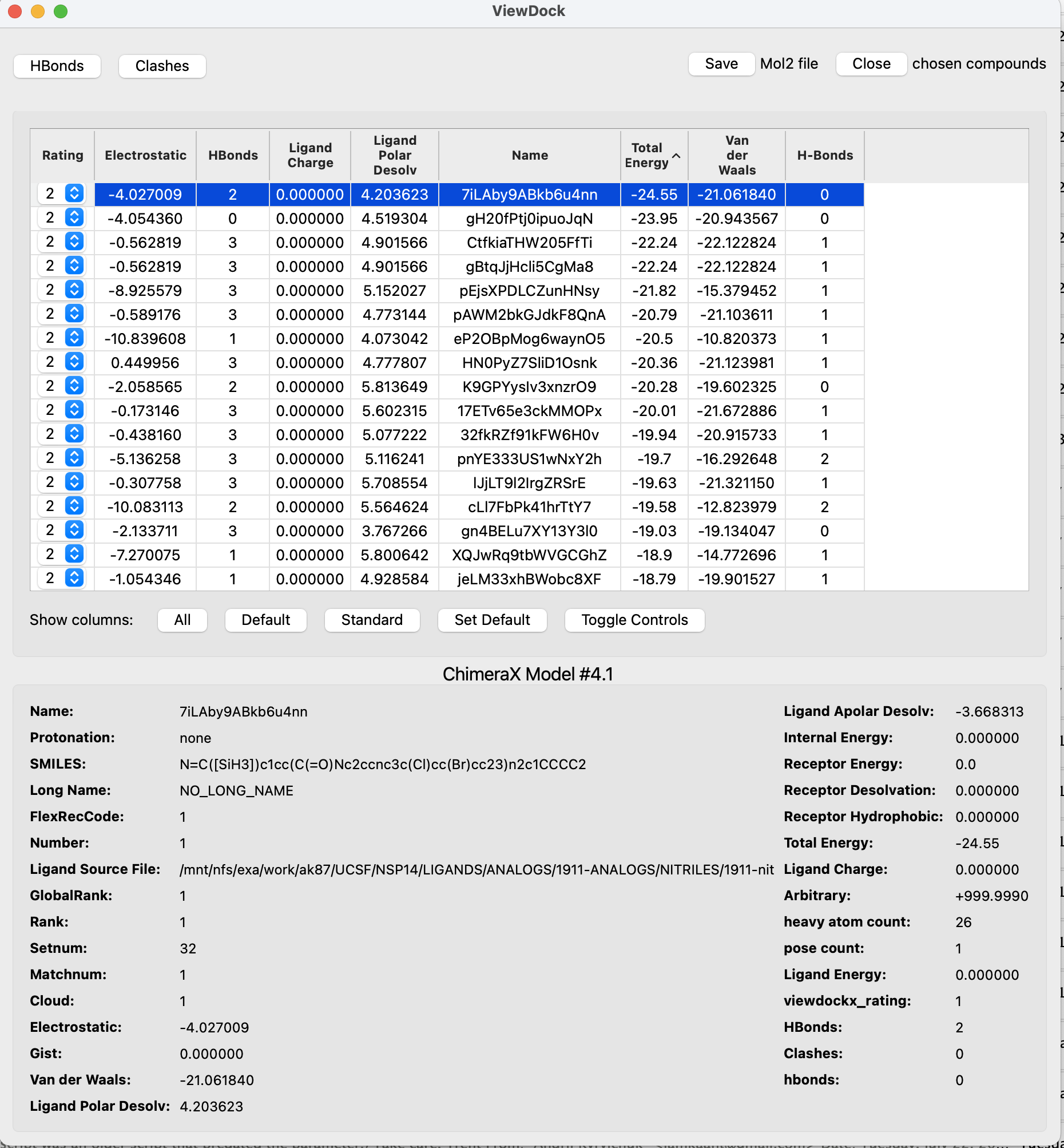
The window width follows the longest data field, leaving wide blank areas (see the screenshot). Could you allow arbitrary window sizes?
Attachments (3)
Change History (27)
by , 12 months ago
| Attachment: | nhfA0Spk0Nce0o04.png added |
|---|
comment:1 by , 11 months ago
| Resolution: | → fixed |
|---|---|
| Status: | assigned → closed |
Hi Andrii,
I believe I have addressed all these issues now:
1) There are buttons on the bottom of the dialog for rating: good / maybe / bad / unrated. The names could be changed if you thought there was a better set.
2) Columns can be rearranged by dragging on their header.
3) The description area text is now selectable and copyable.
4) Long description values now are at the bottom of the description area and use the full width for one label/value pair, rather than trying to fit them into two columns. The description area is also now scrollable, so if it's wide it doesn't force the dialog to be wide. Finally, the columns with the labels use the smallest width possible, so there's less white space between the labels and the values.
These improvements will be in the next daily build. Look for builds dated August 13th or later. If you think of further improvements you'd like to see, don't hesitate to send them.
--Eric
comment:2 by , 11 months ago
Due to problems with Trac, Andrii's response didn't make it into the ticket:
Hi Eric,
Thank you so much, the updated DockView looks great!
While testing it I encountered a bug: after I tried to add HBonds using the button in the DockView window, an error message popped up, and now every time I switch to another ligand, I see the same window
Traceback (most recent call last):
  File "/Applications/ChimeraX_Daily.app/Contents/Library/Frameworks/Python.framework/Versions/3.11/lib/python3.11/site-packages/chimerax/viewdock/tool.py", line 429, in table_selection_changed
    self.update_model_description()
  File "/Applications/ChimeraX_Daily.app/Contents/Library/Frameworks/Python.framework/Versions/3.11/lib/python3.11/site-packages/chimerax/viewdock/tool.py", line 497, in update_model_description
    if len(column_map[title].display_value(docking_structure)) > 20:
           ~~~~~~~~~~^^^^^^^
KeyError: 'hbonds'
I submitted a bug report. Please let me know if you need more info.
Sincerely,
Andrii
comment:3 by , 11 months ago
Hi Eric,

I did some testing and have one suggestion: is it possible to
hide/unhide certain ranks of the ligands? This feature made hit picking
in Chimera incredibly fast. The default setting was to hide all tiers
except "Viable". Once a ligand was marked as "Deleted" or "Purged", it
would disappear from the ViewDock table and from the structure view. The
highlight in the ViewDock would shift to the next ligand and its
structure would be depicted in the structure view.  The majority of time
for hit picking is usually spent on the removal of "bad" ligands. In the
current ChimeraX ViewDock window I have to manually switch to the next
ligand, which takes considerable time, as I need to click the exact row
in the table. Automatic switching would save me a lot of time.

Other than that, the new ViewDock window looks and works great. I
appreciate your work very much! Having the ability to set the default
column layout is extremely useful.

Sincerely,
Andrii

On 8/22/25 1:54 PM, ChimeraX wrote:
>
>
>
>
>
>
>
comment:4 by , 10 months ago
Hi Andrii,
In tomorrow's build, under each rating button will be a "hide" checkbox for hiding (or showing) in the table compounds with that rating. The default setting is to hide compounds rated "bad".
--Eric
comment:5 by , 10 months ago
Hi Eric,

Thank you for letting me know! I'll make sure to check tomorrow's build.

  -- Andrii

On 9/16/25 1:26 PM, ChimeraX wrote:
>
>
comment:6 by , 10 months ago
Hi Eric,

I think I encountered a bug similar to what I observed before:
computation of H-bonds produced an error, and now every time I click on
a row in the ViewDock window, the same error window pops up. I've
submitted a bug report (#18803). Please see the error message below.

Sincerely,
Andrii


>
>
>


On 9/16/25 2:53 PM, ChimeraX wrote:
>
>
>
>
comment:7 by , 10 months ago
comment:8 by , 10 months ago
Hi Eric,

I installed the new daily build (version 1.11.dev202509172136
(2025-09-17)), but I'm still getting an error message during calculation
of H-bonds:

>
I can still continue my work with ViewDock window, if I turn off "Show
this message again".

Please see the example files attached. To reproduce:

1. Open rec.crg.pdb

2. Open the mol2 file

3. Click "HBonds" in the ViewDock window.

I tried it with other files as well and was always getting the same
error message.

I hope this helps.

Sincerely, Andrii

On 9/18/25 3:46 PM, ChimeraX wrote:
>
>
comment:9 by , 10 months ago
Hi Eric,

The new ViewDock works great and has everything I need! The only issue
I've encountered so far is the very long time ChimeraX takes to unhide
ligands with a specific rating. I used a mol2 file with 1500 ligands, of
which about 1000 were hidden. I unchecked the "hide" box by accident,
and after 20 min ChimeraX was still unresponsive, so I closed the app.
Maybe it was caused by the HBond error I had before.

Additionally, ViewDock window doesn't save column order, but that's a
minor inconvenience.

Sincerely,
Andrii

On 9/19/25 10:55 PM, ChimeraX wrote:
>
>
>
>
>
>
>
>
>
>
>
>
>
comment:10 by , 10 months ago
Hi Andrii,
I do not get an error with the files you supplied. Are you certain that you are using a version of ViewDock that contains the fix I made 4 days ago? Look at the top of the log when ChimeraX starts, is the date there Sept. 19th or later?
The column order is retained for me in saved sessions. Is that what you are referring to? If you're not restoring a session, the column order will be whatever it was in the file.
I can reproduce table updates being slow for large changes. I'll look into it.
--Eric
comment:11 by , 10 months ago
Hi Eric,

I removed previous version of ChimeraX_Daily and installed today's build
(UCSF ChimeraX version: 1.11.dev202509201954 (2025-09-20)). However, I
am still getting the error message during calculation of HBonds using
the same files I shared before:

>
>
>
Please let me know if I can provide more data. I can also stop by and
bring my laptop for debugging.

Sincerely,
Andrii

On 9/22/25 2:56 PM, ChimeraX wrote:
>
>
comment:12 by , 10 months ago
Hi Andrii,
I think I've fixed it. It seems that previously you saved a column-display configuration where the H-bonds column was hidden. The table code didn't handle newly added columns being initially hidden correctly.
Fingers crossed this works for you! :-)
--Eric
comment:14 by , 10 months ago
Hi Eric,

I've tested the new version and everything seems to be in order. Thank
you for great work! I will be using ChimeraX for hit picking from now on.

Two small notes:

  * Hiding and unhiding ligands by rating (if I click "hide" checkbox)
    takes really long time. Showing previously hidden rating with a few
    hundred molecules took 2.5 min. Since this only shows the rows in
    the table, and does not render structures, it should probably be faster.
  * It would be really helpful to have an application-wide keyboard
    shortcut to mark the current ligand as bad. Since this is the most
    common operation, it would save a lot of time.

Thanks again!

Sincerely,
Andrii

On 9/23/25 11:30 AM, ChimeraX wrote:
>
comment:15 by , 10 months ago
Hi Andrii,
I just committed a change that makes hiding a large number of rows much faster. I was not able to reproduce the behavior where *showing* a large number of rows was slow. You may have to provide an example for me. Anyway, try out tomorrow's build (dated Oct. 7 or later) and see how it works for you.
--Eric
comment:16 by , 10 months ago
Hi Eric,

Thank you! I'll try it and the key bindings tomorrow.

  -- Andrii

On 10/6/25 5:47 PM, ChimeraX wrote:
>
>
comment:17 by , 10 months ago
Hi Eric,

Everything seems to work perfectly. The key bindings work as expected,
although it took me some time to find where to turn them on. Hiding and
showing multiple structures is instantaneous. This is great! Thank you!

  -- Andrii

On 10/6/25 5:56 PM, ChimeraX wrote:
>
>
>
>
comment:19 by , 9 months ago
Hi Eric,

Just wanted to thank you again for the updates to ViewDock. I've just
finished my first “real” hit picking session with it, and honestly the
ability to do it using the keyboard only is game changing. It saves an
enormous amount of time.

On a side note, two minor complaints:

 - unhiding a few hundred of "bad" ligands still takes ~5 minutes. In my
previous experiment, it was much faster. Maybe it has something to do with
the fact that "bad" ligands now are not in big chunks, but mixed with the
"good" ones?

 - if the current ligand is the last visible (and highlighted) line in the
list, clicking it causes the whole list to scroll slowly but stubbornly to
the end. Attempts to use the scrollbar result in a temporary stop, but once
I release it, scrolling continues.

Sincerely,
Andrii
On 10/8/25 12:53 PM, ChimeraX wrote:

#18300: ViewDock suggestions
-----------------------------------------------+--------------------
          Reporter:  iamkaant@…                |      Owner:  pett
              Type:  enhancement               |     Status:  closed
          Priority:  moderate                  |  Milestone:
         Component:  Surface/Binding Analysis  |    Version:
        Resolution:  fixed                     |   Keywords:
        Blocked By:                            |   Blocking:
Notify when closed:                            |   Platform:  all
           Project:  ChimeraX                  |
-----------------------------------------------+--------------------
Comment (by pett):

 Great!

 --Eric
comment:20 by , 9 months ago
Hi Eric,

I\u2019ve encountered an issue with ViewDock, and I hope you may help me with
it. After the hit picking and saving the session, all molecules except
for those marked as \u201cgood\u201d disappeared. If I use \u201cSave\u201d button in the
ViewDock window, only good ligands are saved. All ligands are still
available in the Models window, but if I save them as a mol2 file, their
ranks aren\u2019t saved.

Is there a way to recover the session?

Sincerely,
Andrii

On 10/15/25 10:42 PM, ChimeraX wrote:

>
>
>
>
>
>
>
>
>

​
comment:21 by , 9 months ago
 From some experiments, it seems that the ligands that get shown are the
ones visible when the session is saved.

I\u2019m using version 1.11.dev202510230043 (2025-10-23)

I\u2019m also duplicating it as a bug report, as I\u2019m unsure if anyone sees
comments to a closed issue.

Sincerely,
Andrii

On 10/24/25 2:43 PM, ChimeraX wrote:

>
>
>
>
>
>
>

​
comment:23 by , 9 months ago
- if the current ligand is the last visible (and highlighted) line in the list, clicking it causes the whole list to scroll slowly but stubbornly to the end. Attempts to use the scrollbar result in a temporary stop, but once I release it, scrolling continues.
I can explain this behavior. If you click on that last line and you move the mouse at all between the down click and the up click then the table thinks it the start of a drag and scrolls down so that you can drag past the bottom edge. Seems like a bug that the scrolling doesn't stop once you release the mouse, but it's a bug in Qt's table widget that I don't know that I can do anything about. I suppose I could file a bug report with Qt.
So one "solution" is to be very careful when you click on the bottom (or top) line of the visible table to make sure that the mouse isn't moving. Another is that I could turn the autoscrolling behavior off, but then the table won't scroll when you *are* trying to drag past the bottom or top. Or I could make autoscrolling an option available in the tool's context menu.
--Eric
comment:24 by , 9 months ago
Also, if you click on any row in the table while the implacable scrolling is happening, it will stop.


screenshot showing wide fields in lower part of interface