UCSF ChimeraX
UCSF ChimeraX (or simply ChimeraX)
is the next-generation molecular visualization program from the
Resource for Biocomputing,
Visualization, and Informatics (RBVI),
following UCSF Chimera.
ChimeraX can be downloaded free of charge
for academic, government, nonprofit, and personal use.
Commercial users, please see
ChimeraX commercial licensing.
ChimeraX is developed with support from National Institutes of Health R01-GM129325.
 ChimeraX on Bluesky:
@chimerax.ucsf.edu
ChimeraX on Bluesky:
@chimerax.ucsf.edu
Anisotropic B-factor data can be shown as thermal ellipsoids, axes, or
ellipses with the
aniso command
or the Thermal
Ellipsoids tool. The image shows myoglobin structure
1jw8
with thermal ellipsoid representations of the heme residue and
protein sidechains that ligate or form H-bonds with the heme.
Metal coordination bonds are shown as purple dashed lines and H-bonds
as gold dashed lines.
For image setup other than position, see the command file
myo-aniso.cxc
(requires ChimeraX version 1.10 from February 2025 or newer).
More features...
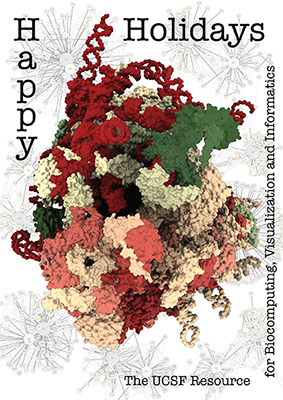
The architecture of the human ribosome has been determined at
near-atomic resolution by electron microscopy (Anger et al.,
Nature 497:80 (2013)).
The structure, comprising 82 proteins and five RNA molecules, is
shown with shadows cast from all directions to accentuate depth.
In the background are schematic representations of contacts
between the component molecules.
See the image setup script
card.cxc
using the
'Tis the Season color palette (credit to MrsP).
See also the RBVI
holiday card gallery.
More images...